UX flows
The /ux-flows page, a map of the app's screens and the flows a user walks through them, with a real screenshot on every screen - its three views, how the screens are captured by agent-browser, and how to add a screen or a flow
/ux-flows is a small page beside the app that maps its screens and the flows a user walks through them. Every screen has a real screenshot of the app in that state and an evidence tag: Observed (captured), Specified (described, not captured yet) or Not captured (the capture failed). It answers "what does the app look like three clicks into comparing two sources?" without opening the app, and it is the place to review a flow before changing it.
The data behind it is small and lives in the repo, under ux-flows/: a registry of screens, each a Terrain Viewer URL, and the flows as Mermaid diagrams in Markdown. The screenshots are not in the repo; a manual workflow captures them and publishes them as release assets.
The UX flows source of truth
Two sets of text files under ux-flows/maps/ are the source of truth. Everything the page shows is derived from them; nothing in the viewer's code knows about any particular screen or flow.
screens.jsonis the registry of screens: id, group, label, the "how you get there" sentence, the URL parameters that produce the state, and for a few screens the agent-browser actions to replay. The sitemap tree, the groups, the inspector's URL state table and every capture URL come from it.compare.md,relief.md,picker.mdare the flows: an intro, notes and one Mermaidflowchart TDblock each, whose node ids are screen ids from the registry. Arrow style carries meaning (thick==>main route, thin-->alternative, dotted-.->way back), diamond{ }nodes are decisions. The Flows diagram, the player's steps and branches, the Canvas arrows and the "reached from / leads to" links are all derived from those blocks.
ux-flows/scripts/build-data.mjs joins the two with the capture manifest into data.json, the only thing the viewer reads. That file and the screenshots are build outputs, published as release assets and copied into the site at deploy time, never committed. To add or change a screen or a flow, edit those files and recapture. The Mermaid parser handles the subset used there: node declarations with [ ], { } and ([ ]) shapes, the three arrow styles and |label| edge labels; subgraphs and styling directives are not supported.
The three views
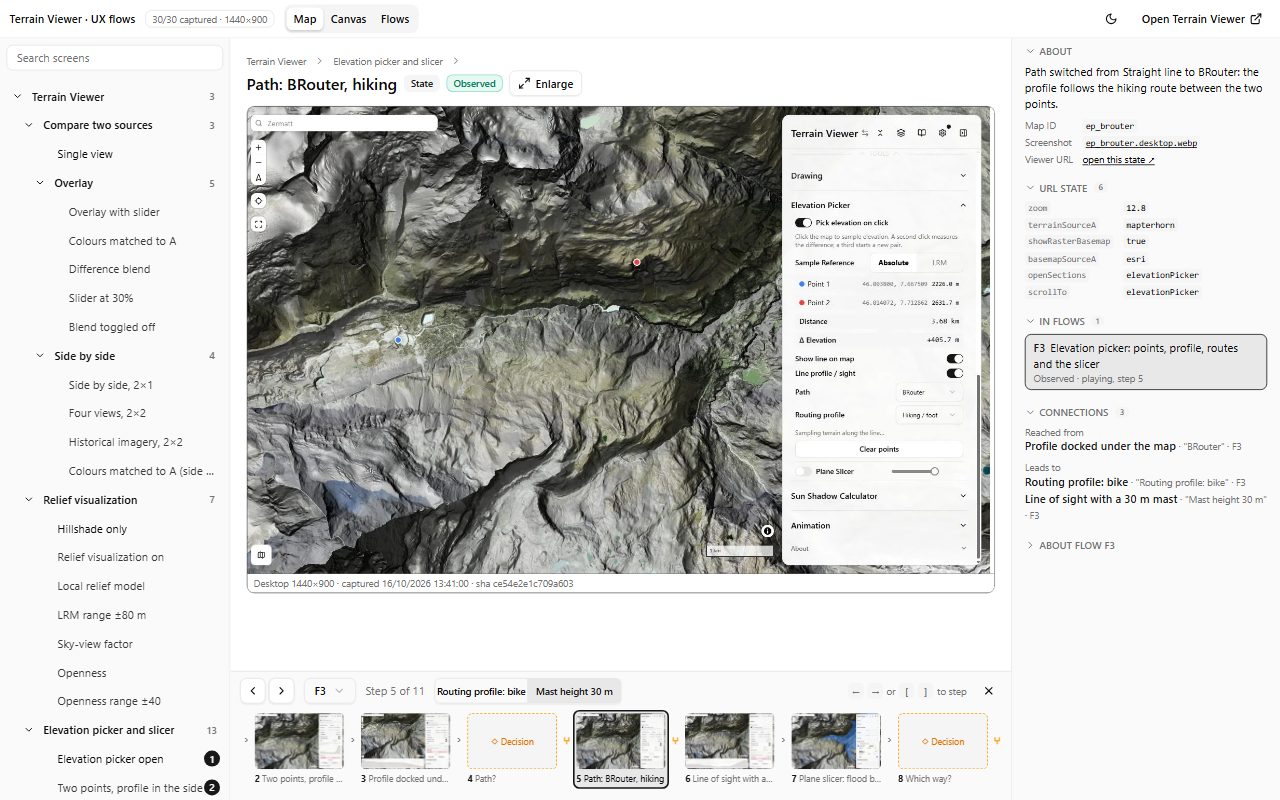
- Map - a sitemap on the left, grouped by feature; the selected screen's screenshot in the middle with its kind and evidence; on the right what the screen is, the URL parameters that produce it, the flows it is in, and where it is reached from and leads to. A flow player docks under the screenshot: a filmstrip of the steps, Previous and Next, and pills to choose a branch where the flow forks. The player's step and branch choices are in the page address, so a link reproduces a path exactly.
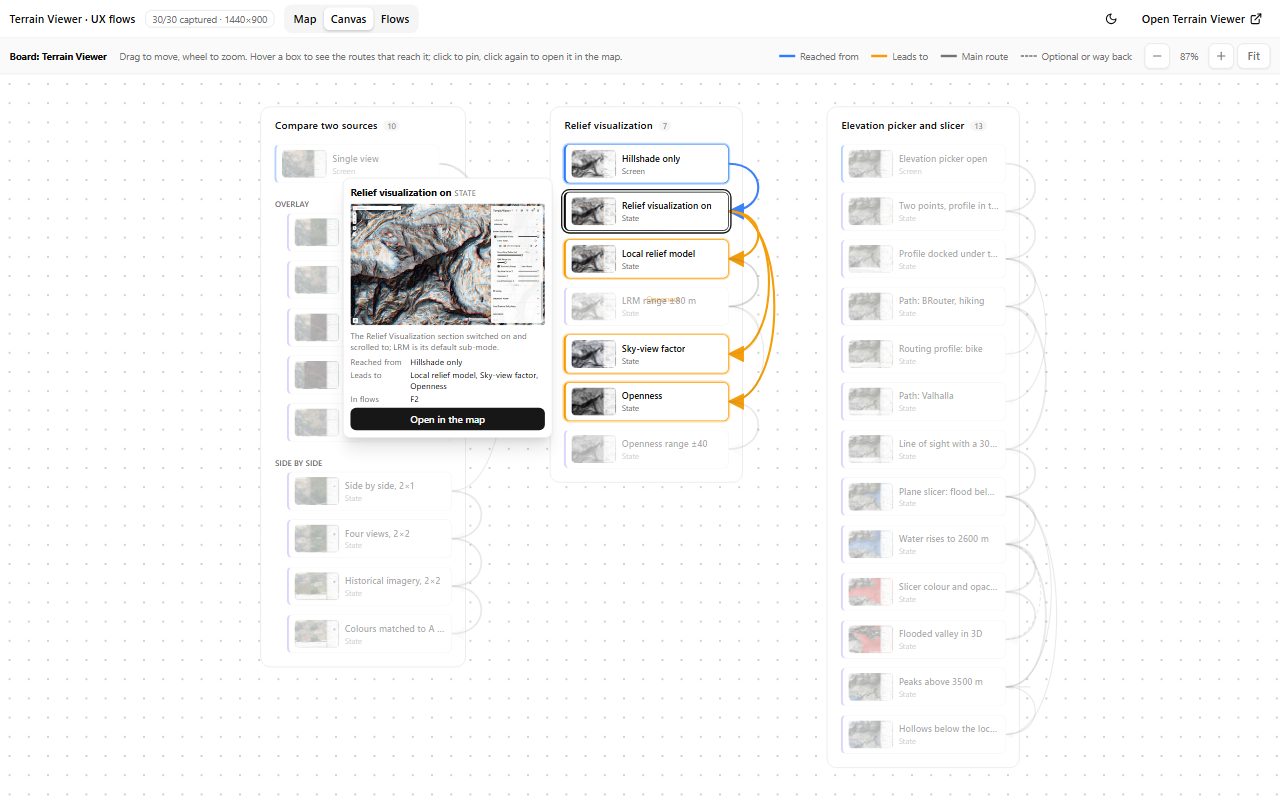
- Canvas - the product as one board. Each top-level group is a frame, its screens are boxes with a thumbnail, and the arrows are the moves the flows draw between them. Hover a box to see the routes that reach it and leave it, with a card showing the screenshot; click to pin, click again to open it in the map.
- Flows - each flow as its Mermaid diagram, with the chosen path lit and numbered, a hover thumbnail on every box, and the path listed below with its branch points. Play in the map starts the player at step one.
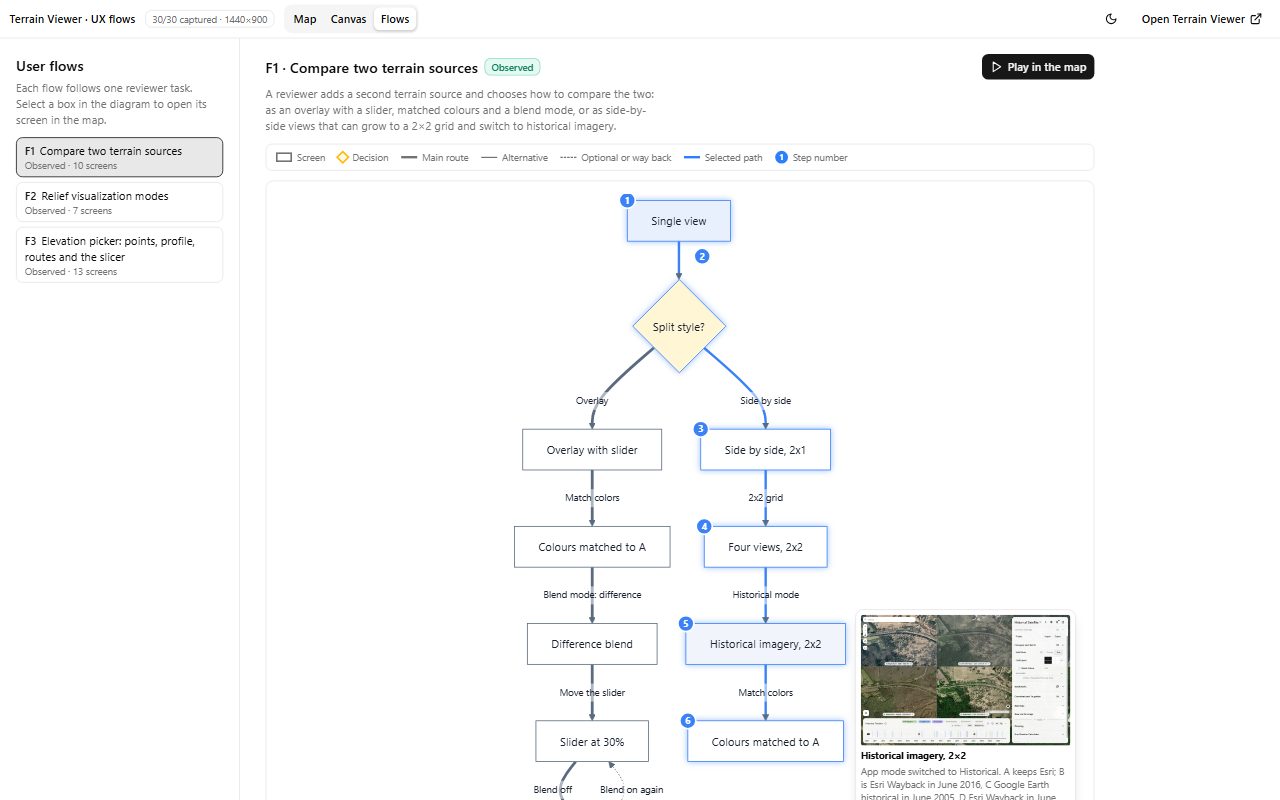
The three flows to start: comparing two terrain sources (overlay, match colours, difference blend, the slider, side by side, 2×2, historical imagery with dated views), the relief visualization modes at the Matterhorn (LRM, SVF, Openness and their ranges), and the elevation picker at Zermatt (two picked points, the profile in the side panel and docked under the map, BRouter and Valhalla routing, the line of sight with a mast, the plane slicer).
How the screens are captured
Every Terrain Viewer setting lives in the URL, so most screens are captured by opening a URL at 1440 × 900 and taking a screenshot. ux-flows/scripts/capture.mjs does that with agent-browser, the same tool that records the demo videos. Each screen also sets openSections and scrollTo, so the side panel shows the section in use.
Some states are not in the URL: points picked on the map, the profile docked under the map, a routing choice. Those screens list actions that the script replays before the shot: a control found by its accessible name in agent-browser's snapshot and clicked or filled, a click on the map at given pixels, a wait. A control that was renamed or removed fails that capture, which the page shows as Not captured, rather than shooting the wrong state. Before every screen the script clears local storage and reloads, so only the URL and the listed actions define what is shot; the app otherwise remembers the pick toggle or a docked profile from the previous screen.
The UX flows capture workflow (Actions tab, run by hand) shoots production, converts the screenshots to WebP, builds data.json, uploads everything as the assets of the ux-flows-latest release, replacing the previous set, and then dispatches the site deploy. The deploy copies those assets into /ux-flows/captures/, so the page reads them from its own origin; a browser could load the images straight from the release but not data.json, since GitHub sends no CORS headers on release downloads. Nothing is committed, and the app build never captures anything: a capture run costs one deploy, pushes cost nothing extra.
Adding a screen or a flow
A screen is one entry in ux-flows/maps/screens.json: an id, a group, a label, a sentence on how the user gets there, and the URL parameters of that state. A flow is one Markdown file in ux-flows/maps/ with a title, an intro and a flowchart TD Mermaid block whose node ids are screen ids; ==> is the main route, --> an alternative, -.-> optional or a way back, and { } nodes are decisions with no screenshot. Then:
node ux-flows/scripts/capture.mjs <screen id>   # or pnpm ux-flows:capture for every screen
pnpm ux-flows:data
pnpm app                                        # http://localhost:5173/ux-flows/
In dev the page reads ux-flows/out/, where the capture wrote; ?assets=<url> points it at any other folder, such as the release. ux-flows/README.md has the action format and the rest of the details.
The page is built from the app's own shadcn components and theme tokens (sidebars, tabs, select, badges), follows the system colour scheme and has its own light/dark toggle in the header.
Making the videos
How the demo videos are made by agents — takes recorded with agent-browser and a DevTools screencast, cut in Remotion with Remocn components, and the commands that run the pipeline
Layer Order and Slots
Why every layer is inserted beforeId an invisible placeholder, and the order those placeholders are in