Lighting Effects (Matcap / Phong / Hard Shadows)
Why these use a real surface normal and a live-GL fast path instead of the pseudo-elevation trick
Matcap, Phong, and Hard Shadows are grouped as "Lighting Effects" in the app's sidebar, but they don't share the terrain-analysis pipeline's pseudo-elevation trick — they need an actual shaded RGBA color per pixel, not a scalar smuggled through raster-dem. All three still start from the same shared surface normal computation.
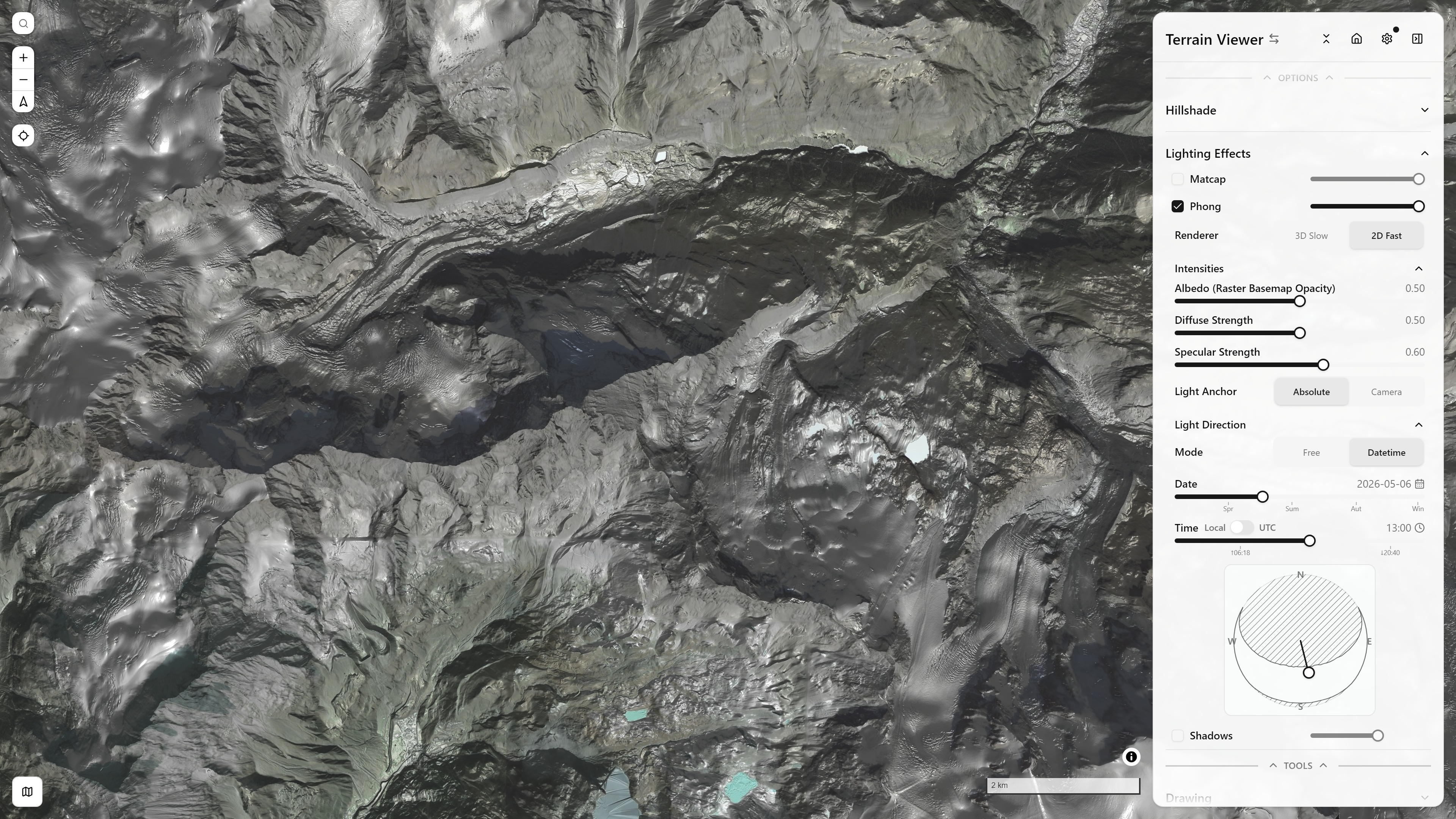
Phong + Hillshade + Raster Basemap, Datetime-driven light direction — Matterhorn massif — open in app ↗
Shared foundation: normals-protocol.ts
lib/normals-protocol.ts computes a per-pixel surface normal from the same Horn gradient (hornGradient()) every terrain-analysis mode uses, via the standard heightfield-to-normal formula — a surface z = f(col, row) has unnormalized normal (-dz/dcol, -dz/drow, 1):
const { dx, dy } = hornGradient(window)
const invLen = 1 / Math.sqrt(dx * dx + dy * dy + 1)
const nx = -dx * invLen, ny = -dy * invLen, nz = invLen
This is an object-space normal map (not tangent-space — a heightfield has no per-vertex tangent-basis ambiguity): R/G/B = (nx, ny, nz) * 0.5 + 0.5, with nx along the tile's column axis (east), ny along the row axis (south), nz up. It does not go through runNormalDerivedProtocol (which always re-packs as Terrarium pseudo-elevation) — Matcap and Phong both need the raw normal vector, not an elevation-shaped scalar.
Computation runs on the GPU via WebGL2 (computeNormalPixelsGPU in gpu-normal-compute.ts — one draw call does every pixel's gradient+normalize+encode at once) with a CPU-loop fallback if WebGL2 is unavailable. Results are cached without any matcap/phong-specific parameter (rotation, light direction, strength) — both protocols call computeNormalPixels(upstreamTemplate, encoding, z, x, y, n, signal) with identical arguments regardless of their own params, so dragging a rotation or light-direction slider reuses the already-computed normal map and only redoes that protocol's own cheap final step.
Two independent rendering paths, per mode
Matcap and Phong each ship two implementations sharing that one normal computation:
addProtocolraster path (matcap-protocol.ts,phong-protocol.ts) — the classic custom-protocol tile handler, feeding a plaintype: "raster"source (notraster-dem). Each call does the normal fetch, a final GPU-accelerated shading pass (gpu-matcap-compute.ts/gpu-phong-compute.ts— a fragment shader draw +readPixels, CPU-loop fallback otherwise), PNG-encodes, and returns bytes. Because MapLibre's raster-source model has no live-uniform hook, any parameter change forces a brand-new tile round trip.- Live-GL layer path (
matcap-live-gl-layer.ts,phong-live-gl-layer.ts) — aCustomLayerInterfacemounted viamap.addLayer, exposed in the UI as the "Fast" option.onAddbuilds a persistent tile mesh/VAO;render()runs every MapLibre frame, fetching each visible tile's normal texture once (cached per z/x/y, via the samecomputeNormalPixels) and thereafter only rebinding uniforms (rotation, exaggeration, opacity, light direction) and redrawing. A slider drag becomes a uniform write +triggerRepaint()— never a refetch/PNG round trip. This is the actual "live" distinction, not per-frame DEM recomputation.
Hard Shadows has no live-GL counterpart or GPU compute path — only the addProtocol raster route, CPU-only.
Both raster protocols also carry a hand-rolled staleness guard (__currentParamsKey, module-scoped) on top of the abort signal: live instrumentation showed MapLibre does not abort in-flight tile requests when a source's tiles URL template itself changes (a new rotation/light commit) — abortController.signal.aborted never flips for them. Since MapLibre's raster tile cache is keyed by z/x/y (not the full URL), an old-template result could otherwise land in a slot after a newer-template result already did, repainting it with stale shading — the actual cause of an "old, new, old, new" flicker. __currentParamsKey tracks the most recent params tuple across all calls to that protocol and refuses to resolve a call whose tuple has since been superseded, independent of what the AbortController reports.
Matcap: material-capture lookup
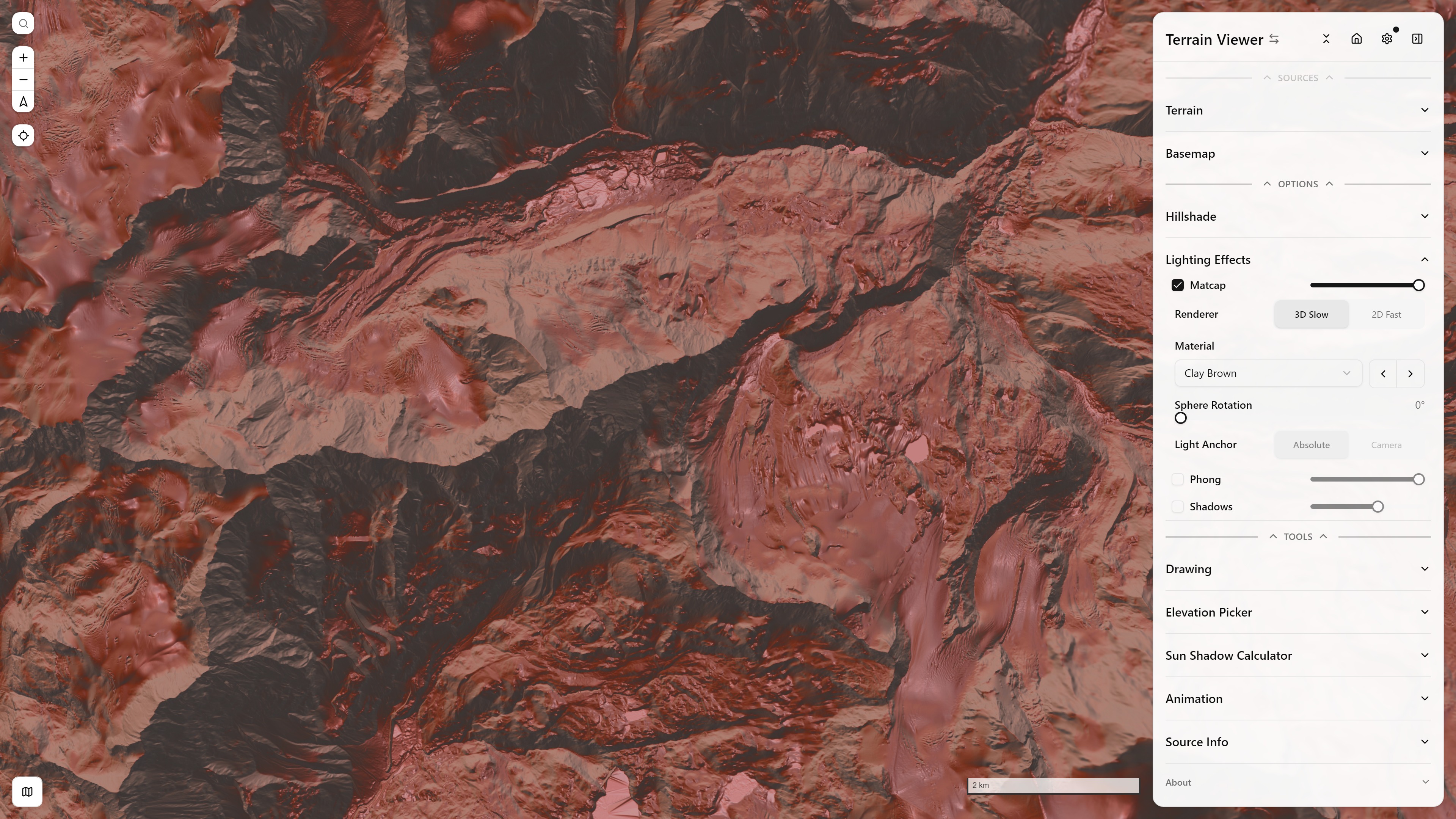
Matcap — Clay Brown material — Matterhorn massif — open in app ↗
The rotated normal's (x, y) is used directly as a UV into a curated matcap material image (lib/matcap-textures.ts, a Potree/Blender-style set, plus a generated Duotone NW/NE Sphere: a grey light from the top-left and a top-right light whose lit side is blue and shaded side orange, the duotone hillshade as a material) — an orthographic simplification in the protocol/GPU-compute path:
vec2 nxy = vec2(n.x * cb + n.y * sb, -n.x * sb + n.y * cb);  // rotate by u_rotationRad
vec2 uv = nxy * 0.5 + 0.5;
vec3 matcapColor = texture(u_matcap, uv).rgb;
The live-GL-layer version uses the same lookup, with a choice of frame via its Light Anchor toggle: Absolute samples by the tile-space normal exactly as above (pinned to compass directions, matching the raster pipeline), while Camera (the default) projects the normal onto the camera's live right/up basis first — the classic view-space matcap, so the material tracks pitch/bearing like a sphere held up to the current view. (An earlier build instead reflected a per-fragment view ray off the normal; that doubled the angular response and painted a screen-locked blob of the matcap's center over flat terrain, and was scrapped.)
Phong: ambient + diffuse + specular
const AMBIENT = 0.35, SHININESS = 32
const diffuse = diffuseStrength * Math.max(nx*lx + ny*ly + nz*lz, 0)
const diffuseIntensity = Math.min(Math.max(AMBIENT + diffuse, 0), 1)
const specDot = Math.max(nx*hx + ny*hy + nz*hz, 0)           // H = normalize(L + V), V = (0,0,1)
const specular = specularStrength * Math.pow(specDot, SHININESS)
const total = diffuseIntensity + specular
Light direction is compass-fixed by default (state.illuminationDir/illuminationAlt — the same fields the on-map "hold L, drag" light control and MapLibre's own hillshade illumination direction use), not camera-relative — panning/rotating the map must not spin the light, unlike Matcap's material which is deliberately camera/rotation-relative. phong-live-gl-layer.ts adds an opt-in "headlamp" mode reinterpreting azimuth/altitude as an offset from the camera's live bearing+pitch instead.
The az/alt → (x, y, z) light-vector signs were pinned by empirical measurement against MapLibre's own native hillshade shader (rendering both at a known illumination direction, reading back pixels via gl.readPixels, and computing the Pearson correlation of luminance) rather than derived from first principles — an earlier attempt to reuse aspect-protocol.ts's dx/dy→compass formula as "ground truth" produced a plausible but inverted answer for the east/west sign (r ≈ −0.89 at due-east light before the fix, r ≈ +0.93 after).
total is encoded into a single alpha channel across two regimes, composited over the basemap raster with ordinary "over" blending (there's no multiply-and-screen blend mode in the MapLibre style spec):
total ≤ 1(shadow/neutral): color = black,alpha = 1 - total→basemap*(1-alpha) + black*alpha = basemap*total, a true multiply-darken.total > 1(specular highlight): color = white,alpha = total - 1→ a screen-like brightening, letting a strong reflection paint brighter than the albedo.
diffuseIntensity alone is capped at 1, so ordinary sunlit slopes (however bright) stay in the shadow/neutral regime — only specular can push total past 1 into the highlight regime.
Up to three coloured lights (live renderer)
The live renderer takes up to three lights. Light 1 is the app light shared with hillshade and shadows, with its own colour (white by default, so nothing changes until a colour is set). Lights 2 and 3 have their own azimuth, altitude and colour (phongLightCount, phongLight2Dir, phongLight2Alt, phongLight2Color, and the same for 3) and only reach Phong; in Camera anchor mode they rotate with the camera like the first. Their diffuse terms add per channel and are averaged, so a slope reached by every light stays at the single-light maximum and a slope reached by one takes that light's hue; specular is averaged the same way. The defaults are the duotone hillshade palette: blue from the north-east and orange from the south-east, which with a white key light from the north-west gives the two-tone LiDAR look with real specular highlights. The raster renderer keeps a single grey light: its output is one scalar packed into alpha, which cannot carry a hue.
Under Light Direction, Free mode shows a Lights 1 / 2 / 3 choice and one colour swatch per light; the extra lights are pills of their colour on the same pad and drag like the first.
Fresnel rim
Fresnel Rim under Intensities adds Schlick's grazing-angle term, (1 - n·v)^p, where v is the direction from the ground to the camera: slopes that turn away from the viewer brighten along their edge, the way a glancing surface reflects more. It is view dependent: the live renderer rebuilds the view vector from the map's bearing and pitch every frame; the raster tiles (and the Iso-line's Phong measure) take the viewer straight above, n·v = n_z. The view vector is rebuilt (one direction for the whole viewport, which at terrain scale is indistinguishable from a per-pixel one), and the term takes the opposite of the theme's background: on the dark theme it adds into the specular channel as a white rim, on the light theme it multiplies the albedo down as a dark rim (the shade buffer cannot add a negative). Rim Falloff is the exponent p (phongFresnelStrength, phongFresnelPower): 1 is a broad glow, 8 a thin line. In a top-down view n·v is close to 1 everywhere flat and the rim only picks out steep faces; it comes into its own tilted, where it reads as back-lit ridges.
Hard Shadows: single-ray horizon march toward the sun
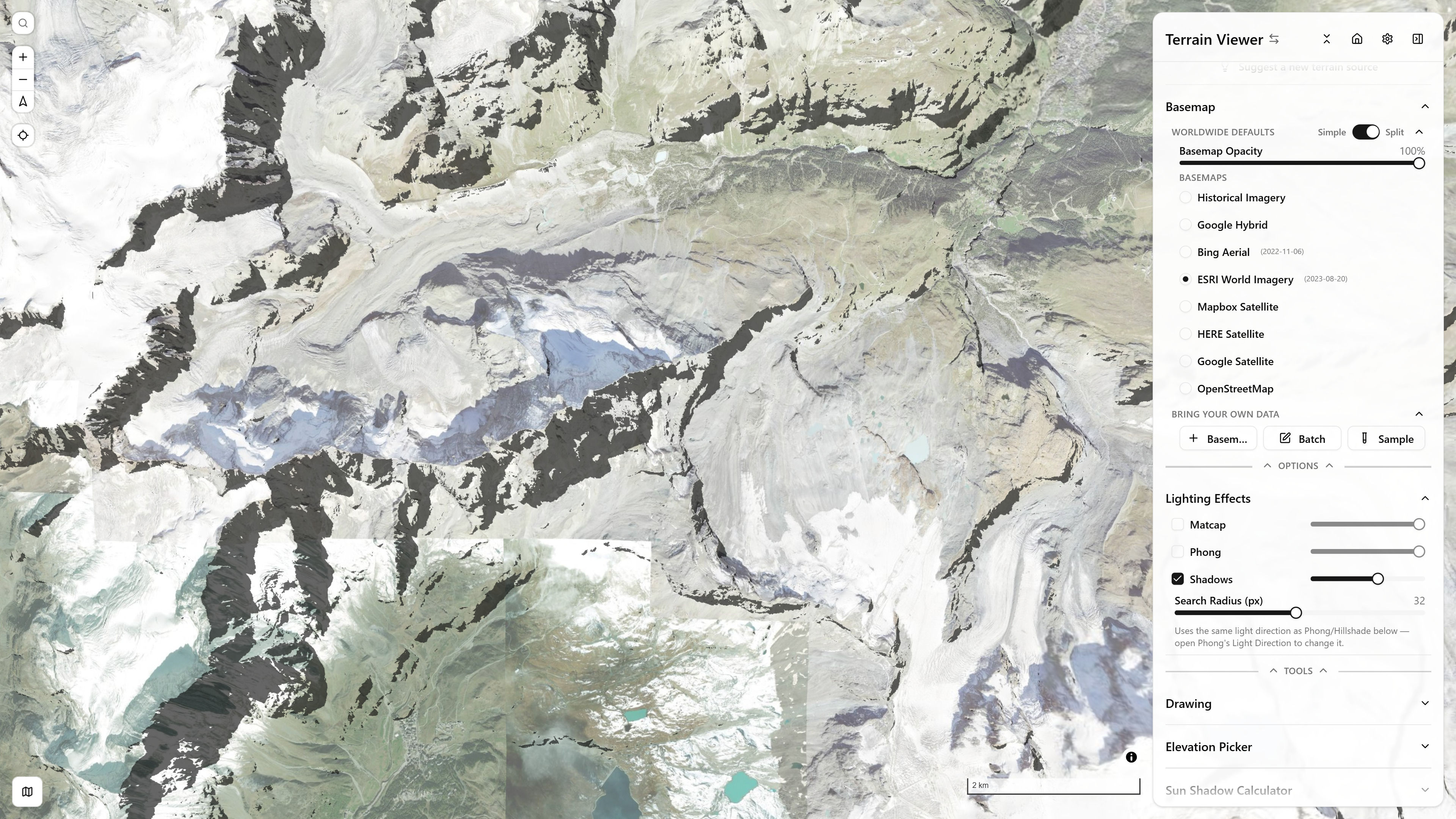
Hard Shadows + Hillshade — Matterhorn massif — open in app ↗
lib/shadow-protocol.ts does not call into horizon-angle.ts's SVF/Openness functions — it's a hand-written single-ray variant of the same idea, explicitly framed that way in its header comment. SVF/Openness check 8 fixed compass directions and aggregate; a cast shadow only cares about one direction — straight toward the sun's actual azimuth (not snapped to a 45° tick):
const dCol = Math.sin(azimuthRad), dRow = -Math.cos(azimuthRad)
for (let r = 1; r <= radiusPx; r++) {
  const elevDiff = padded[(pr+rr)*stride + (pc+rc)] - centerElevation
  const angle = Math.atan2(elevDiff, dist)
  if (angle > maxAngle) maxAngle = angle
}
const inShadow = maxAngle > altitudeRad
If anything between the pixel and the sun rises above the sun's own altitude angle, the pixel is in shadow. Output is plain opaque black where inShadow, fully transparent otherwise — the raster layer's own paint opacity (state.shadowOpacity) controls how dark shadows actually read on screen, the same convention every other derived-mode layer uses. Computation is synchronous CPU/JS, yielding periodically like the terrain-analysis protocols, with no GPU path and no live-GL layer.
Azimuth/altitude for Hard Shadows share the same state.illuminationDir/illuminationAlt state as Hillshade and Phong (no separate light control) — and can be driven by real solar position via the sun-position math.
Draping
What MapLibre 6 drapes over its terrain, why Matcap and Phong keep a raster path and a live GL path, and the tile-seam fix are on Draping custom layers.