Saved Views
A view stored in your own AT Protocol account (Bluesky or any other server), behind a short link that anyone opens without signing in. Beta.
A saved view is the current view (camera, mode, sources, visualization settings) written as one public record in your own AT Protocol account, the kind of account Bluesky uses. The app has no server and keeps nothing: the record lives on your account's server, and the short link ?view=at/<account>/<id> tells any copy of the app where to read it.
It differs from a bookmark, which stays in one browser, and from the ordinary Share link, which carries the whole state in a long address.
The idea comes from Placemark, where Tom MacWright stores maps in the user's AT Protocol account from the browser alone: placemark/placemark#281.
Turn it on
The feature is in beta and off by default. Open Settings, find Saved views, short links (AT Protocol) and switch Beta on. The flag is local to the browser. Opening a ?view= link needs neither the flag nor an account.
Sign in
Open Share (in Download and Snapshot). The Save view, short link box asks for a handle.
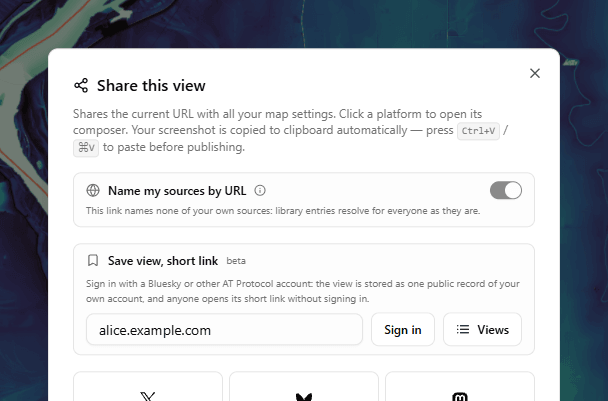
Signed out: type a handle, then Sign in. Views lists that account's saved views without signing in.
- Type your handle (
alice.bsky.social, or your own domain), a DID, or thehttps://address of your server. - Sign in sends you to your account's own server, which asks you to accept. The app never sees your password.
- You come back to the view you left, with the Share dialog open.
What the app asks for is narrow: creating, changing and deleting records of its own type (com.iconem.terrainviewer.view) and uploading pictures. It cannot read or write your posts, follows, likes or messages.
Any AT Protocol server works, not only Bluesky's: a self-hosted server, or another provider. An old server that does not know granular permissions may refuse the sign-in.
Save
Give the view a title (optional), keep or clear Include a picture of the map, and press Save view. The short link appears in green: click it to copy.
Saving does not post anything. The record is in a collection only this app uses, so it does not appear in your Bluesky feed, on your profile, or in anyone's timeline. It is public all the same: anyone who has its address can read it, and a repository browser such as pdsls.dev shows it under your account, like every record of an AT Protocol account.
What is stored, and where
| Where | Your account's server (PDS), in the collection com.iconem.terrainviewer.view |
| What | The view's parameters as the address bar spells them, a title, the date, the mode, the host and build it was saved from, and the picture if you kept it |
| Never | API keys. The app keeps them in the browser's storage, not in the address, and a parameter named like a credential is dropped anyway |
| Masked | A key inside a source address (…?api_key=…) becomes a placeholder. The panel warns you: that source will not load for other people |
The record keeps the mode it was saved in (Terrain, Historical, River REM), so the link opens in that mode whatever mode the visitor used last.
List, open, copy, delete
Signed in, the box lists your saved views, newest first, with their picture, title, date and mode.
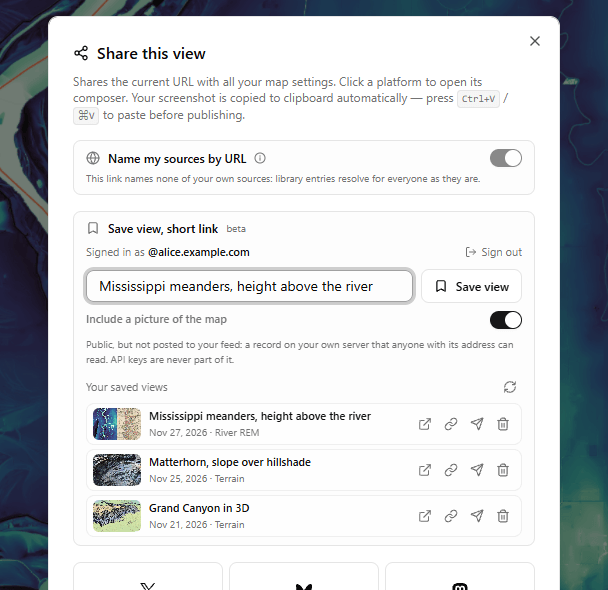
Signed in (an example account): each saved view has Open, Copy link, Post and Delete
- Open loads the view in this tab.
- Copy link copies its short link.
- Delete asks once, in place, then removes the record and its picture from your server. The link then answers "This view no longer exists".
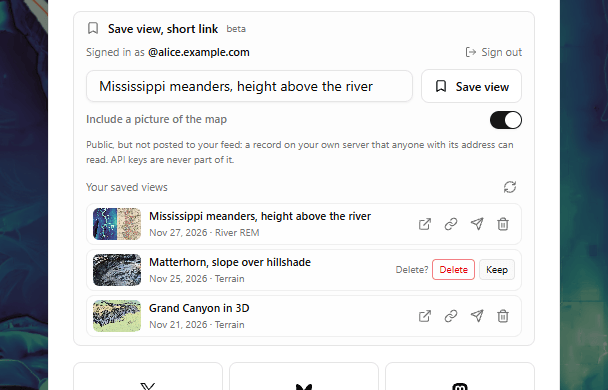
Signed out, Views reads the list of any account whose handle you type. The list is public, so no sign-in is involved, and it has no Delete.
Open a link
https://terrain-viewer.iconem.com/?view=at/<handle or DID>/<id> opens for everyone, signed in or not, beta flag or not. The app finds the account's server, reads the record, and replaces the short address with the full one. A view saved in a mode that has its own page gets its link there (/rem/?view=…, /historical/?view=…).
If the record was deleted, the account is gone, or its server does not answer, the app says which and opens on its default view.
Post to Bluesky (optional)
A saved view can be published as a Bluesky post whose card shows the view's own title and picture. A post carries its card itself, so this is the one place where a short link shows the view's picture.
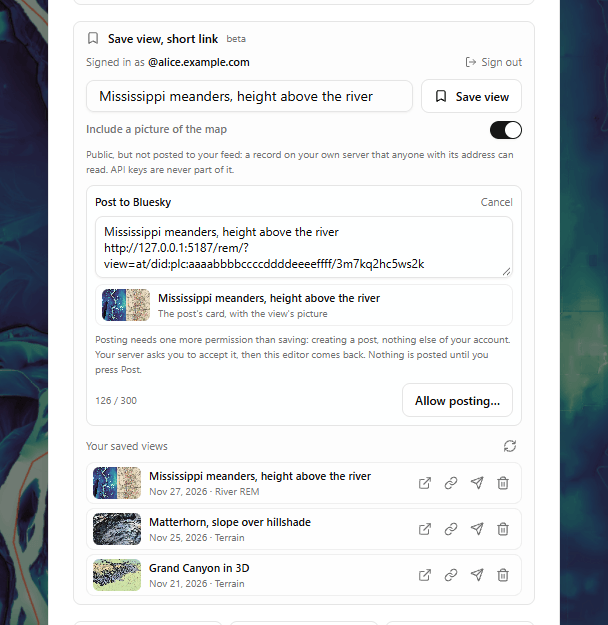
The editor opens first; the text is yours to change
- Post… (next to a fresh link, or the paper plane in the list) opens an editor. Nothing is published until you press Post there.
- Posting needs one more permission than saving: creating a post, and nothing else. The first time, Allow posting… sends you to your server to accept it, then brings the editor back. People who only save views are never asked for it.
- To go back to the narrow permission, sign out and sign in again.
The Post step has not been run against a real account yet: the request for the wider permission was checked against Bluesky's server, the publication itself was not.
Limits of a client with no server
The app signs in from the browser alone, as a "public client". That has costs, stated plainly:
- A sign-in lasts two weeks. Bluesky's server gives a browser-only client a session of at most two weeks, against months for an app with its own server. After that, sign in again. Saved views and their links are not affected.
- The sign-in keys sit in the browser's storage. Any script running on the page could read them. The narrow permission bounds the damage: records of this app's own type, and pictures.
- A link needs its author's server. If that server is down, or the account is deleted or deactivated, the link does not open. Nothing is cached on our side, because there is no "our side".
- No picture preview for a short link. A chat or social network that unfurls a link reads the page's HTML without running scripts, and this site is static: every
?view=link shows the site's general preview (or the mode's, for/rem/and/historical/), not the view's picture. No static route can change that: a page per view would have to be built and deployed for each save. The exception is the Bluesky post above. Showing the view's own picture everywhere would take one small server-side piece (a single route that reads the record and answers with the right tags), which the app does not have. - A record is public and copies may outlive it. Deleting removes it from your server; relays or archives that read it earlier may keep their copy.
For developers
Files. lib/view-sharing.ts is the one door the app goes through. lib/atproto-view.ts has no dependency: the reference parser, the record builder, the public reads (getRecord, listRecords, plain fetch), the post record, the client's identity. lib/atproto-oauth.ts is the only importer of @atcute/oauth-browser-client and is loaded on demand. The panel is components/TerrainControlPanel/SavedViewPanel.tsx. src/main.tsx settles a ?view= link and the sign-in's return before React starts.
Client metadata. An AT Protocol OAuth client is identified by the https address of a JSON file, and its redirect address must be on the same host. So each deployed host has its own static file, public/atproto/<host>.json, and the page picks the one named after its hostname. A new host needs a file and an entry in OAUTH_CLIENT_HOSTS; a test compares the files with what the code describes. The file's scope declares the most the app may ever ask for (saving, plus creating a post); each sign-in requests a subset, and the server grants what was requested. Bluesky's server refuses a scope the file does not declare.
Development. The protocol has a built-in loopback client for development: its id is http://localhost?redirect_uri=…&scope=… and the redirect must be an IP literal. The page therefore has to be open on http://127.0.0.1:<port>, not http://localhost:<port> (the session is stored per origin). Start Vite with --host 127.0.0.1.
The record.
{
  "$type": "com.iconem.terrainviewer.view",
  "title": "Mississippi meanders, height above the river",
  "createdAt": "2026-11-27T10:12:00.000Z",
  "schemaVersion": 1,
  "appVersion": "18217e2",
  "site": "terrain-viewer.iconem.com",
  "params": { "appMode": "rem", "lat": "33.1467", "lng": "-91.1258", "zoom": "10.5" },
  "thumbnail": { "$type": "blob", "ref": { "$link": "bafkrei…" }, "mimeType": "image/jpeg", "size": 151234 }
}
params is the query string key by key, values as strings (the AT Protocol data model has no floats, and the URL spelling is what the app already reads); a repeated key is a list. appMode is always present in records written since 2026-11-27. Credential-named keys are dropped and credentials inside values masked, on write and again on read. The thumbnail is a JPEG of at most 1200 px.
Sign-out. Sign out revokes the session's token at the account's server and deletes the keys from the browser.
Tests. node scripts/test-lib.mjs lib/atproto-view.test.ts lib/mode-share-url.test.ts (offline, recorded fixture).